Wednesday, October 5, 2016

User Friendly Future of SharePoint

User Friendly Future of SharePoint


Find blog about SharePoint friendly future. Microsoft delivering
successful experiences to enterprise platforms, at the time of
announcement of SharePoint 2016 general availability. Three other areas of innovation were also
pointed out. Find Details Here.

Tuesday, September 20, 2016

Add Items and Update Multiple Items in SharePoint 2013 Datasheet View

Have you checked the SharePoint 2013? The new DataSheet View comes loaded with tons of awesome new features such as adding items dynamically, Viewing Items Properties from the datasheetView, features to update multiple Items and so much more. The Datasheet View in SP2013 is considered more as a view for multiple editing of items. In the Custom list, users will have option to edit Items, which would open the list in the datasheet view for editing. But users will have to create the Datasheet view in the document libraries. 

Below is a quick look at the SharePoint 2013 Datasheet View new features:


Adding New Item


  • In the SharePoint 2013 Datasheet View, there are two ways to add an item to a list. Users will have the option to add single item in a list view, or multiple items in spreadsheet view.
  • Add a single item in list view by navigating to the site with the list on which you want to add an item.
  • Click on Settings SharePoint Online Public Website Settings button > Site contents, in the list section, choose the name of the list.
  • Select Settings SharePoint Online Public Website Settings button > Site contents, and then in the appropriate list section, select the name of the list.
  • Choose the items tab and select new item in the new group. 
  • Type the information you require for the list.
  • You can attach a file to the list item on the Edit tab, in the Action group, choose attach file, browse to locate the file you want to attach and click ok. 


Adding multiple items in SharePoint 2013 Datasheet View


  • Move to the site where the list you want to add an item.
  • Choose Settings SharePoint Online Public Website Settings button, click Site contents and select the name of the lint in the list section. 
  • On the top of the list, select edit. Type the information for the list.
  • Select Stop editing this list
  • If you want remove and information, click the ellipsis, next to the item and select Delete Item from the drop-down menu.

While adding multiple items in SharePoint 2013 Datasheet View, users can switch easily from list view to spreadsheet view by just selecting the View and Quick Edit commands respectively. And while adding an item in a list, a site can be modified in appearance and navigation, incase users cannot located certain options such as command, button, or link, contact your administrator.

Monday, September 12, 2016

SharePoint 2013 Branding using JavaScript

SharePoint 2013 Branding is the procedure of changing the appearance and impression of the SharePoint 2013 user interface using custom master pages, style sheets, images, JavaScript and jQuery. An excellent branding will lead you to improved content presentation, superior navigation, better appearance, additional browser support, allows responsive web design and increases user adoption. Additionally hiding fields is necessary to stop a spectator from viewing them and to let an administrator view across the world. It would be advantageous to have the JavaScript code and selectively apply it to a page. Nonetheless, till now everyone is restricted, no matter who they are. 
Moreover, SharePoint designer is the medium for serious SharePoint customisation. However, if we can apply this JavaScript within the SharePoint publishing feature framework, then SharePoint Designer is not essential. You can run it through the browser, which will eventually help to curb the expense which is needed for SharePoint Designer licensing, user training, governance training and customization. Lastly, one of the major problem is security. Any authentication reasoning depending on customer’s end, leads the JavaScript to manipulation which will be out of control. In such scenarios, JavaScript can be deactivated, or it can be played by debugging proxies such as fiddler.
If you want to opt for a long-lasting branding especially production, it is better to go for Visual Studio in order to generate a wsp package. In this way, you will have an installed package that can be reinstalled and used in test and dev. environment. It will also be easy for you to ensure that the package works before shifting to production. Additionally, you can use Java for modifying the objects. If you want to find the objects, you can use F12 – Developer Toolbar that is built into IE. Alternatively, you can use suiteBarLeft, suiteBarRight, suiteBrandingBox, DeltaSuiteLinks, suiteBarRight and RibbonContainer-TabRowRight which are part of the 2013 default objects.

Lastly, you need to activate both the site collection and site level to access. You can make some modifications to a team site's master page to revamp the appearance and texture of the site, there are numerous limitations to take into account. At the end of the day, everything depend on your requirements and the purpose of your site collection. If you would want to permit your users to modify the page layouts for their sites, including the ability for people to manage approval of these pages, you need to activate the publishing feature. All of these have different assets to be configured.

Tuesday, September 6, 2016

SharePoint E-mail Integration - Are there Any Valid Reasons to go for it?

E-mails play a crucial role in business today. SharePoint email integration takes an equally important position in the corporate world. In this blog post, we will discuss the reasons that make SharePoint email integration good and valid in the current time. 

The significance of e-mails in the corporate world is self-explanatory as these are omnipresent in everyone's business life - no matter whether the business is a small or big one. 

On an average, knowledge workers send & receive emails exceeding 25,000 per year. Additionally, they spend one to two hours every day reading & responding to the same. 

This issue has spread now to the large world of information governance because it has been estimated that 10 of such emails need to be classified in form of a record.

Following image depicts the potentially troublesome situation in regard to email records. 


SharePoint E-mail Integration


From this figure, it can be easily interpreted that how the situation exists for e-mail records. The data is based on results for an organization with 1,000 users. It can be noticed that 10 percent of all emails are classified as records. Total number of e-mail records per day comes out to be 12,600. Out of these, 8,800 e-mails were among the sent ones while 3,800 e-mails were received on a daily basis. 

SharePoint email integration can definitely be beneficial for any global organization. Let's discuss the reasons how that can be.

1. Compliance


As it has been revealed by almost every global organization, compliance is a major concern in the current time. This concern is especially of paramount importance for organizations with large amounts of sensitive data like payment information or health records. 

Data breach can have dangerous consequences on an organization and when it’s about e-mail the effects can be far worse. Hackers may deploy the data for wrong purposes causing a huge set back to your business integrity. 

Typically, huge amount of critical data cannot be sent in an e-mail due to size constraints. This may be a constraint for some users but may be a saver in case that e-mail gets hacked by unauthorized people.But in organizations, data is not just sent via attachments in e-mail but also as plain text. Hence, it becomes critical to safeguard every e-mail that goes out.

Luckily, there are tools in place for avoiding the situation which can be made use of while communicating your message via e-mail. 

Any sort of breach of an organization’s email can lead to catastrophic consequences. Hence, it’s a must for all employees to be aware of potential threats related to email compliance. Besides increasing chances of a potential breach, the most troublesome consequence of bad email governance relates to the threat of eDiscovery.  

So, following are the ways in which SharePoint email integration can help to solve these issues - 

• By suitably classifying email and related attachment and then moving the same into SharePoint, you can manage the same properly
• Records manager can have a better visibility to email records
• It becomes possible to put through email records via suitable defensible disposition process

2. Employee Productivity


As we have already discussed above, employees spend almost 25 percent of their workday in reading and replying to the received emails. Besides that, an incredible amount of time is spent by employees in searching the correct document.

These are the two factors that collectively drain tremendous amount of productivity in almost every business unit. However, the good thing is that these issues can be effectively solved using the right blend of process improvement & technology.

• SharePoint email integration allows your employees to make use of familiar workflows & products

• Once your email records move into SharePoint, they get centrally located. This leads to ease in locating, managing and disposing the records as required.

• Once your email records are in SharePoint, it becomes possible to automatically classify them like any other document

3. Complete Information Governance


No doubt, productivity & compliance are the two major concerns bearing the potential to save immense amount of time & money for any organization. 

However, it needs to be fully understood that complete information governance encompasses each of the following - 
• Employee
• Division
• Business unit

Nothing can cut across all these three lines like email does. Henceforth, effectively practicing information governance cannot be possible without including email. Following is what needs to be done in this regard - 

• Make a deep analysis to understand the manner in which SharePoint email integration effectively fits into the larger picture. Also decide early who will be involved.
• Suitably address gaps or inconsistencies existing in your process that are yet to be fixed. 

To conclude it can be said that SharePoint email integration definitely makes some sense and organizations must go for it just like they choose to go with dedicated SharePoint hosting considering its numerous benefits. 


Monday, June 20, 2016

VMware Virtual Appliance – Different Aspects Worth Knowing

A virtual appliance (VA) can be defined as a pre-configured virtual machine (VM) image file possessing a pre-configured operating system (OS) environment and having a single application.


For All Details Visit at : http://blog.techarex.net/vmware/vmware-virtual-appliance-different-aspects-worth-knowing/


Friday, June 17, 2016

How to Use Pre- Fill Forms in QuickBooks

In order to avoid manual entry of the same data again and again, QuickBooks offers features to automate certain tasks. One is the Pre-fill forms with previously entered content. It was also known as auto recall setting.
How to turn pre-fill On and OFF
To turn it on or off follow the given mentioned steps:

Step 1:          Gear > Company Settings > Advanced > Pre-fill forms

                      with previously entered content.


For Example, you enter check number 72 to Matheson Utilities for $100:


Step 2:                        If you had turned pre-fill ON then create check 73.
Step 3:                        From the drop-down menu, choose Matheson Utilities as the vendor.
QuickBooks auto- populates all the fields based on check 72.

Step 4:            If you had turned pre-fill OFF, check number 73 would appear like, a blank check:

Forms affected by the pre-fill setting
The Pre-fill setting affects all the checks, bills, expenses, delayed credits, delayed charges, purchase orders, vendor credits, and credit card credits forms. All of these forms are located at Create (+) on the top of the QuickBooks screen.
On selecting a vendor, customer, or employee in these forms QuickBooks Hosting auto-populates the transaction (account, amount, and so on, except for the date field), based on the last saved transaction of that type for the specific person.
CONDITIONS
Turn pre-fill ON if:
·      Your Checks/expenses are entered for the same vendor assigned to the same expense account on a regular basis for example in a monthly utility bill.
No matter, if the dollar amount changes from month to month, it is still convenient of having the account and description filled in for you.

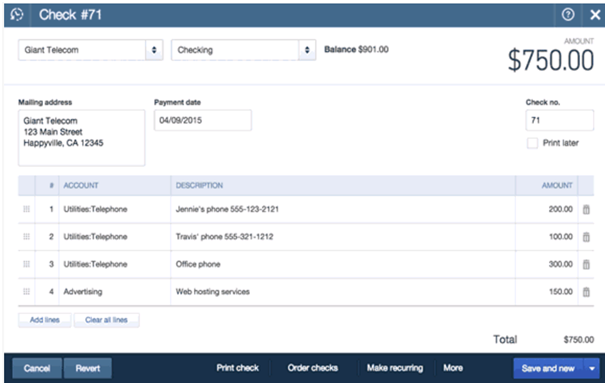
·      Your regular checks/expenses are split to the same multiple accounts, as shown in the figure:


Turn pre-fill OFF if:
·      You suppose to pay vendors for different things, for example, most of your checks/expenses to a specific vendor are for varied expense accounts or assigned to different customers and classes.

·      You have few checks/expenses splits into multiple accounts.

·      Your QuickBooks file is shared with other users, and you’re worried that the other user might forget to change the amount and by mistake record a duplicate of an original transaction instead of a new transaction.

Notes:

·      If you want to  pre-fill an invoice, open the invoice you want to copy from,
then click More > Copy (at the bottom of the screen).

·      In order to auto recall a timesheet, open the timesheet, enter the vendor /employee whose timesheet you want to recall, set a new date, and then click Copy last timesheet (at the bottom of the screen).

·      To use the pre-fill setting frequently but not on a particular transaction, just click the Clear all lines button below the table.

For More QuickBooks Hosting Tips and Tricks visit Techarex Networks .

Tuesday, April 26, 2016

Common Mistakes While Planning The Disaster Recovery Plans

A company’s disaster recovery planning is a tedious process. So try not to complicate it further than it is supposed to be by trying to do too much or figuring out a way of cutting corners. Careful planning is probably you’re only bet for a successful recovery.

Disaster Recovery

At the beginning of the New Year, many IT folks, perhaps even a few business managers try to resolve and take steps to avoid the interruption of events and handle the possible interruptions that can't be avoided at all. Basically, they decide on getting serious about data protection and disaster recovery Plan of the company planning for smooth operations.

Common sense about the necessity to distribute the budget, resources and time to the planning process could also be reduced by the market structure and hype around technologies such as server virtualization, data de-duplication, clouds, etc.

1. DR is not equal to high availability. For maximum companies, about 10% of workloads fall into the "always on" category.
2. All applications need not fit in one DR approach. A mutual corporate mistake in planningis to try toapply a one-size-fits-all data protection strategy. Always remember, “defense in depth."

3. Don't put in all your effort to back up everything. Expecting that all your data protection requiresbeing included in one backup process is again a common mistake. 

4. Do not overlook data that isn’t stored centrally. Forgetting about outlying data repositories is another common blunder. Not everythingis centralized in an enterprise or some complicated scale-out network-attached storage (NAS) boxes. Mission-critical data exists in branch offices, desktop PCs, laptops, tablets and, gradually, smartphones. 

5. Avoid data mismanagementand infrastructure. One more mistake DR planning novices make is ignoring root causes of disaster, which is the lack of organization of data and infrastructure. 

6. Don't duplicate equipment configurations at the recovery site. Only a subsection of applications and data need to be re-instantiated succeedinganupsetting event, you don't essentially have to design a recovery environment matching your normal production on a one-for-one basis. 

7. Remember to fortify your WAN connections. Entrusting in WANs and underestimating the negative impact they can have on recovery timeframes is one of the other rookie error.

8. Don't trust your cloud provider too much. It is not as prominent as some of the above-mentioned pitfalls, placing too much conviction in a cloud service provider to deliver disaster application hosting or post-disaster data restoration makes it to the last place on the list of potential mistakes that enterprises make while chalking the company’s disaster recovery plan. One should plan touse a cloud to host your recovery environment and make sure that it has all the jazz listed in the brochure which includes a Tier-1 data center.