Monday, June 20, 2016

VMware Virtual Appliance – Different Aspects Worth Knowing

A virtual appliance (VA) can be defined as a pre-configured virtual machine (VM) image file possessing a pre-configured operating system (OS) environment and having a single application.


For All Details Visit at : http://blog.techarex.net/vmware/vmware-virtual-appliance-different-aspects-worth-knowing/


Friday, June 17, 2016

How to Use Pre- Fill Forms in QuickBooks

In order to avoid manual entry of the same data again and again, QuickBooks offers features to automate certain tasks. One is the Pre-fill forms with previously entered content. It was also known as auto recall setting.
How to turn pre-fill On and OFF
To turn it on or off follow the given mentioned steps:

Step 1:          Gear > Company Settings > Advanced > Pre-fill forms

                      with previously entered content.


For Example, you enter check number 72 to Matheson Utilities for $100:


Step 2:                        If you had turned pre-fill ON then create check 73.
Step 3:                        From the drop-down menu, choose Matheson Utilities as the vendor.
QuickBooks auto- populates all the fields based on check 72.

Step 4:            If you had turned pre-fill OFF, check number 73 would appear like, a blank check:

Forms affected by the pre-fill setting
The Pre-fill setting affects all the checks, bills, expenses, delayed credits, delayed charges, purchase orders, vendor credits, and credit card credits forms. All of these forms are located at Create (+) on the top of the QuickBooks screen.
On selecting a vendor, customer, or employee in these forms QuickBooks Hosting auto-populates the transaction (account, amount, and so on, except for the date field), based on the last saved transaction of that type for the specific person.
CONDITIONS
Turn pre-fill ON if:
·      Your Checks/expenses are entered for the same vendor assigned to the same expense account on a regular basis for example in a monthly utility bill.
No matter, if the dollar amount changes from month to month, it is still convenient of having the account and description filled in for you.

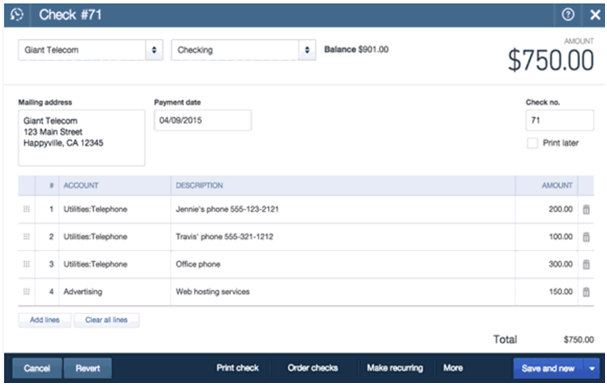
·      Your regular checks/expenses are split to the same multiple accounts, as shown in the figure:


Turn pre-fill OFF if:
·      You suppose to pay vendors for different things, for example, most of your checks/expenses to a specific vendor are for varied expense accounts or assigned to different customers and classes.

·      You have few checks/expenses splits into multiple accounts.

·      Your QuickBooks file is shared with other users, and you’re worried that the other user might forget to change the amount and by mistake record a duplicate of an original transaction instead of a new transaction.

Notes:

·      If you want to  pre-fill an invoice, open the invoice you want to copy from,
then click More > Copy (at the bottom of the screen).

·      In order to auto recall a timesheet, open the timesheet, enter the vendor /employee whose timesheet you want to recall, set a new date, and then click Copy last timesheet (at the bottom of the screen).

·      To use the pre-fill setting frequently but not on a particular transaction, just click the Clear all lines button below the table.

For More QuickBooks Hosting Tips and Tricks visit Techarex Networks .

Tuesday, April 26, 2016

Common Mistakes While Planning The Disaster Recovery Plans

A company’s disaster recovery planning is a tedious process. So try not to complicate it further than it is supposed to be by trying to do too much or figuring out a way of cutting corners. Careful planning is probably you’re only bet for a successful recovery.

Disaster Recovery

At the beginning of the New Year, many IT folks, perhaps even a few business managers try to resolve and take steps to avoid the interruption of events and handle the possible interruptions that can't be avoided at all. Basically, they decide on getting serious about data protection and disaster recovery Plan of the company planning for smooth operations.

Common sense about the necessity to distribute the budget, resources and time to the planning process could also be reduced by the market structure and hype around technologies such as server virtualization, data de-duplication, clouds, etc.

1. DR is not equal to high availability. For maximum companies, about 10% of workloads fall into the "always on" category.
2. All applications need not fit in one DR approach. A mutual corporate mistake in planningis to try toapply a one-size-fits-all data protection strategy. Always remember, “defense in depth."

3. Don't put in all your effort to back up everything. Expecting that all your data protection requiresbeing included in one backup process is again a common mistake. 

4. Do not overlook data that isn’t stored centrally. Forgetting about outlying data repositories is another common blunder. Not everythingis centralized in an enterprise or some complicated scale-out network-attached storage (NAS) boxes. Mission-critical data exists in branch offices, desktop PCs, laptops, tablets and, gradually, smartphones. 

5. Avoid data mismanagementand infrastructure. One more mistake DR planning novices make is ignoring root causes of disaster, which is the lack of organization of data and infrastructure. 

6. Don't duplicate equipment configurations at the recovery site. Only a subsection of applications and data need to be re-instantiated succeedinganupsetting event, you don't essentially have to design a recovery environment matching your normal production on a one-for-one basis. 

7. Remember to fortify your WAN connections. Entrusting in WANs and underestimating the negative impact they can have on recovery timeframes is one of the other rookie error.

8. Don't trust your cloud provider too much. It is not as prominent as some of the above-mentioned pitfalls, placing too much conviction in a cloud service provider to deliver disaster application hosting or post-disaster data restoration makes it to the last place on the list of potential mistakes that enterprises make while chalking the company’s disaster recovery plan. One should plan touse a cloud to host your recovery environment and make sure that it has all the jazz listed in the brochure which includes a Tier-1 data center.

Friday, April 22, 2016

Finally SharePoint Server 2016 has been released as a Preview Installation

The good news for all the businesses out there is the SharePoint Server 2016 preview is released. The IT Preview has been planned, developed, and verified with the Microsoft Software as a Service (SaaS) strategy. SharePoint Server 2016 IT Preview is planned to help you succeed new levels of dependability, performance, supplying features and abilitiesto simplify administration, protect communications and facts, and empower customers while meeting their demands for better business mobility. You can choose from anout-datedin-house deployment, a hosted service with Microsoft Office 365 sites powered by Microsoft SharePoint Online, deployment in Azure Infrastructure as a Service (IaaS), or a combination of these choices with a hybrid approach, allowing you to improveout-dated in-house scenarios with the modernization in the cloud. SharePoint Server 2016 IT Preview forms the investments of previous SharePoint releases and helps in reducing IT expenses with a cloud inspired set-up and scalable collaboration platform, provides better handling risk by protecting your business with secure and reliable capabilities and delivers modern teamwork experiences across devices and screens.


The in-house version of SharePoint Server 2016 is exclusive in the Microsoft and includes most of the new features built in, and is used as the baseline for the in-house SharePoint Server 2016 product. Nevertheless, not all of its competencies will make it to the in-house version, but those that don’t will be presented as Office 365 Services, so you can control them from your in-house implementation. SharePoint Server 2016 will have functionality that will permit easy integration of Office 365, especially SharePoint Online, with your SharePoint Server 2016 in-house deployment. Ultimately, Microsoft understoodthat users wanted a hybrid approach, so SharePoint Server 2016 was planned to encourage and ease the implementation and management of a SharePoint hybrid solution. In order to install SharePoint Server Preview, you have to follow the below mentioned steps:

1. Firstly, review SharePoint Server 2013  system necessities
2. Secondly, you have to download and install full-featured software for a 180-day trial
3. When prompted, use the following product key: NQTMW-K63MQ-39G6H-B2CH9-FRDWJ

The installation procedure is comparatively straightforward but there are two things that might come as a surprise, especially to those who are trying to create a small SharePoint deployment. First, it's still possible to generate a single server deployment. Yet, single server deployments no longer use SQL Server Express. Hence, you are going to require a full-blown SQL Server even if you are installing only a single SharePoint Server.

Monday, April 18, 2016

Public Vs. Private Cloud for your Business

Different kinds of businesses have different sets of objectives and goals. To accomplish any goal or objective, there has to be a pertinent plan of action. For a business using cloud computing services for its growth across the internet, it is essential to have a spot on cloud computing. It can be either public, private or a shared cloud computing service.
The two most commonly employed cloud computing services are public and private cloud computing. Both have their own set of benefits. To have a better understanding of the two cloud computing services, read below:


Public clouds Public cloud works on the model of pay-per-usethat means that a client pays only for the resources they utilize and only for the time they use it.
Public cloud computing service allows users across the internet worldwide to access the assets and the resources of your business.
A Public cloud offers a multi-tenant environment with unlimited accessibility to the resources shared on cloud. On the entire cloud, with all the users, same ITA products and devices are shared, including hardware as well as software.
It is basically a self-managed system. The use of the available resources on the cloud is all dependent on the user and his or her requirement.

Private Cloud  A single team, organization or a client enjoys access to the business assets or resources.  A Private cloud offers a single-tenant environment with limited accessibility provided to its resources. It works as a closed domain of information meant primarily for the authorized users.
Since the resources are handy only to the members of the cloud, there is a safer and secured environment assured for the data assets and other resources being shared on the cloud.
Private cloud offers greater compliance than a public cloud.
Small and Medium-sized enterprises (SMEs) havebetter preference for a private cloud computing service for their business.
To encourage the deployment of cloud computing service for your business, there are several Cloud Computing Service Providers (CSPs) which offer free cloud hosting services to organization for a fixed period of time on contractual basis. This is to win over their confidence in investing money in cloud computing service for a better business growth on a larger spectrum on internet.
With the growing IT industry and the increasing need of online business expansion, it is essential that we keep upgrading our IT resources as per the latest developments. The businesses being operated on cloud need to update the type of cloud computing service they have engaged to make the most of the service for their business.

Friday, April 15, 2016

Manage Business Accounts with Sage 50

What is a Peachtree?

This is an application especially designed for Small and Medium businesses for their accounting requirements like integrating innumerable accounts payables and receivables, tracking banking transactions, preparing spreadsheets and managing invoices.

This Application is majorly used by construction contractors or subcontractors for functions like job costing, assets tracking, progress billing etc. For a single user, Peachtree system requires 1 GHZ processor and 512 RAM whereas, for multiple users, the minimum requirement is 1.8 GHz processor and 1 GB RAM.

It is easier to use automated accounting rather than manual bookkeeping.

This application is designed in such a way that even a non-accountant can easily use it. The standard operating principle is as simple as giving a quote to the customer, creating a job order and preparing an invoice.

To use this application one must configure the software in accordance to their business requirement. For each configuration it is essential that the user must run the setup wizard.
This application comes with several in-built features to cater to all accounting requirements. In the case of a small business setup, which needs lesser number of features, the owner has to pay for the entire Application, whether it is completely used or not.


What is Sage 50?

Sage 50 accounting is an Accounting Software to help with accounting and bookkeeping tasks by helping keep a track on the company’s expenditure and accounts receivables as well as payables in addition to managing payrolls.Using this software helps business stay compliant with the industry norms.

One of its major advantage is that one can access data from anywhere and from any system that has Sage 50 installed.

Since the entire data is stored on the desktop, accessing and working on this application becomes easy.

Maintaining payrolls and its add-ons in compliance with government rules is easy and minimise the risk of payroll penalties that occur as a result of using older tax slabs.

By using this Sage 50 Accounting software, one can make transactions via credit and debit cards. This feature help minimise calculation errors and duplicate entries.

Remember Peachtree? It’s now Sage 50 Accounting!Peachtree and Sage 50 Accounting is one and the same thing. This application is dynamic and user-friendly and one can perform same tasks on it. The company can increase its productivity and efficiency by installing this software and allow multiple users an easy accessibility to the same data.

Tuesday, March 29, 2016

Fog Computing - Is it the Cloud's Future

Experts in the industry opine that Cloud may not be necessarily sufficient for meeting the rapidly increasing demands of current time. To counter this problem, fog computing will play a crucial role in the coming time as it involves extending the fundamental Cloud computing technology to a network's edge thus causing the end devices and datacenters to operate in a more seamless manner. Henceforth, fog computing can be seen as the extension of Cloud computing but almost replacing the parent technology due to its effectiveness.


So, what Fog Computing Stands for?

Fog extends the Cloud much closer to all things that not just produce but also act on Internet of Things (IoT) data. Deployment of such fog nodes or devices can be done anywhere within a specific network connection. A fog node can be any device having computing, storage, & network connectivity - examples of which include routers, switches, industrial controllers, embedded servers etc. Fog computing can be applied successfully when one or more of the following conditions are met -
·         Data collection occurs across the extreme edges
·         Data generation is happening by means of millions of sources
·         Very short time, almost less than a second, is available for analyzing and acting upon the data

What Advantages Fog Computing Brings Along?
·        
       Better business agility - Developers will be able to develop fog applications quickly & accordingly deploy the same as per requirement.
·         Improved Security - By deploying physical security & cyber security solutions as deployed in your IT environment, it will be possible to safeguard fog nodes more efficiently.
·         More Useful Insights - Easily analyze all your mission-critical data locally rather than transferring it to Cloud for analysis purpose.
·         Reduced Operating Expense - Process sensitive data locally and conserve network bandwidth to bring down the operating expenses.

Fog Computing as Cloud's Future...

The Internet of Things generates two exabytes of data on a daily basis and fog computing offers Cloud that much-needed companion to effectively handle such data. Moreover, exploding data volume, velocity and variety has always been a big challenge and with fog computing this challenge is solved too as data is processed nearer to the source of its production. Also, round trip to the Cloud is eliminated as this advanced form of computing ensures accelerated response to events. Despite these interesting pros associated with fog computing, slow industry adaption will be one of the greatest limitations associated with it besides some unsolved questions on security as well. But undoubtedly fog computing will enjoy the leading edge over Cloud computing and hence it would not be wrong to consider it as the future of Cloud computing.